Cracking The Amazon OA Design Round
If you thought Amazon’s online assessment was just about LeetCode speed‑runs, surprise: the system design portion is where many otherwise strong candidates quietly fail.
Not because they’re bad engineers.
Because they walk in thinking “draw some boxes, mention S3, pray” is a strategy.
Let’s fix that.
Below is a practical guide to Amazon online assessment design rounds: what’s being tested, what patterns you’re expected to know, and a repeatable structure you can use even when the prompt blindsides you.

What Is the Amazon Online Assessment Design Round?
For many SDE II+ roles (and increasingly some SDE I / internship pipelines), Amazon includes a system design style question either as part of the online assessment or later in the virtual onsite.
You might see it in different flavors:
- System design OA: A written or diagram‑style prompt (e.g., “Design a URL shortener” or “Design a notifications service”).
- Object‑oriented / OO design OA: More focused on class design, interactions, and API surfaces.
- Hybrid: A slightly simplified design problem embedded after coding questions.
Regardless of format, Amazon is testing three things:
- Can you take a vague product request and ask sharp clarifying questions?
- Can you decompose the problem into reasonable components aligned with real‑world constraints?
- Can you communicate trade‑offs clearly and make principled choices?
If you only memorize architectures from YouTube and never practice the reasoning, you’ll sound generic and brittle.
How the Amazon Design OA Is Usually Structured
The exact format changes over time, but you’re typically dealing with:
- A single scenario prompt with multiple sub‑questions.
- Time‑boxed (often 60–90 minutes for the whole assessment; design might be 20–40 minutes of it).
- Answer via typed explanations and sometimes rough diagrams or bullet points.
Common themes:
- Design an internal service (e.g., logging, metrics, inventory, recommendations)
- Design an external product feature (e.g., order tracking, feed ranking, search autocomplete)
- Design a background or batch system (e.g., report generation, ETL pipeline)
You’re not expected to build AWS from scratch.
You are expected to:
- Handle scale where appropriate.
- Show fault tolerance / resilience awareness.
- Think about data modeling and APIs.
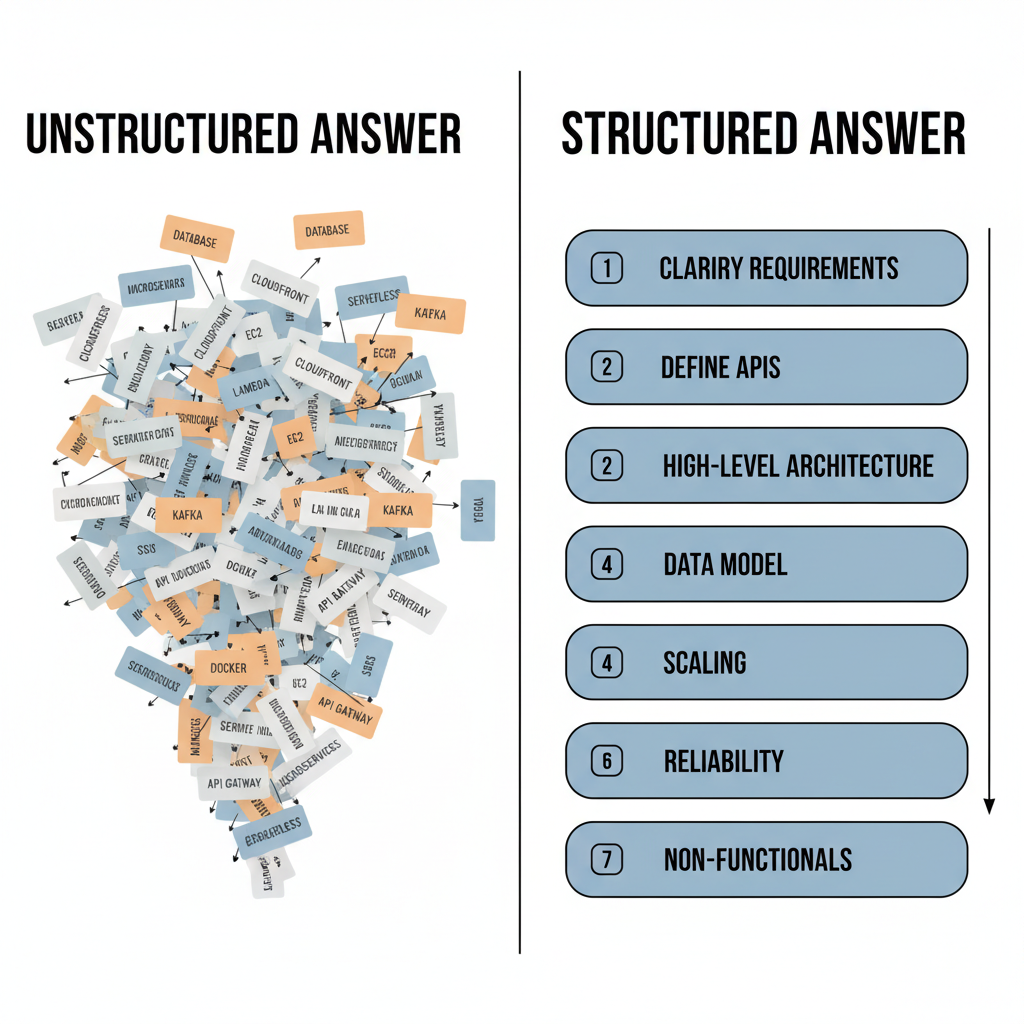
The 7‑Step Framework for Amazon OA System Design
Use this structure as a checklist. In an OA, you’ll mostly write this out instead of saying it, but the logic is identical.
1. Restate the Problem & Clarify Requirements
Start by summarizing what you think you’re being asked to build.
Example (Design a URL shortener):
“We need a service that shortens long URLs into compact links which redirect users to the original URLs. It should handle high read traffic, support link expiration, and basic analytics (click count).”
Then ask (or write down and answer) clarifying questions:
- Users & scale: How many active users? Requests per second for read vs write?
- Latency: Is sub‑100ms redirection required globally?
- Features: Expiration? Custom aliases? Authentication?
- Consistency vs availability: Is it okay if analytics are eventually consistent?
In an OA you often can’t ask a human, so you:
- Make reasonable assumptions.
- State them explicitly: “Assumption: We expect 100M stored URLs and ~50K redirections per second globally.”
2. Define APIs and Core Use Cases
Before architecture, show you understand how the system will be used.
For a URL shortener example:
POST /shorten– Takes a long URL, optional expiry, returnsshortUrl.GET /{shortCode}– Redirects to the long URL.GET /stats/{shortCode}– Returns analytics (click count, last accessed, etc.).
For an Amazon‑style feature like order tracking:
GET /orders/{orderId}– Returns status, estimated delivery.POST /orders/{orderId}/events– Internal event updates from logistics systems.
Keep it simple; the OA cares more that your APIs:
- Are coherent and minimal.
- Map cleanly to the use cases.
3. High‑Level Architecture: Draw the Big Boxes First
Now outline the main components. Text works fine:
- API Gateway / Load Balancer – Entry point for clients.
- Service layer – Business logic (e.g.,
ShorteningService,OrderTrackingService). - Datastores – Relational DB, NoSQL store, cache, search index, etc.
- Messaging / Streaming – For events, async processing, decoupling.
For an Amazon‑like retail system design, think in terms of bounded contexts:
- Order Service
- Inventory Service
- Payment Service
- Notification Service
You don’t need AWS‑spec name‑dropping (“I’d use DynamoDB + SQS + SNS + Lambda + …”) to look smart. Instead, describe capabilities:
- “A horizontally scalable key‑value store for high‑throughput writes”
- “A durable, at‑least‑once message queue to decouple producers and consumers”
You can mention AWS analogues briefly: “e.g., DynamoDB / Cassandra” but keep the reasoning front and center.
4. Data Modeling: What Are You Storing and How?
Even in a short OA, a quick data model shows depth.
For a URL shortener:
- Table:
urlsshort_code(PK)long_urlcreated_atexpires_atcreator_user_id
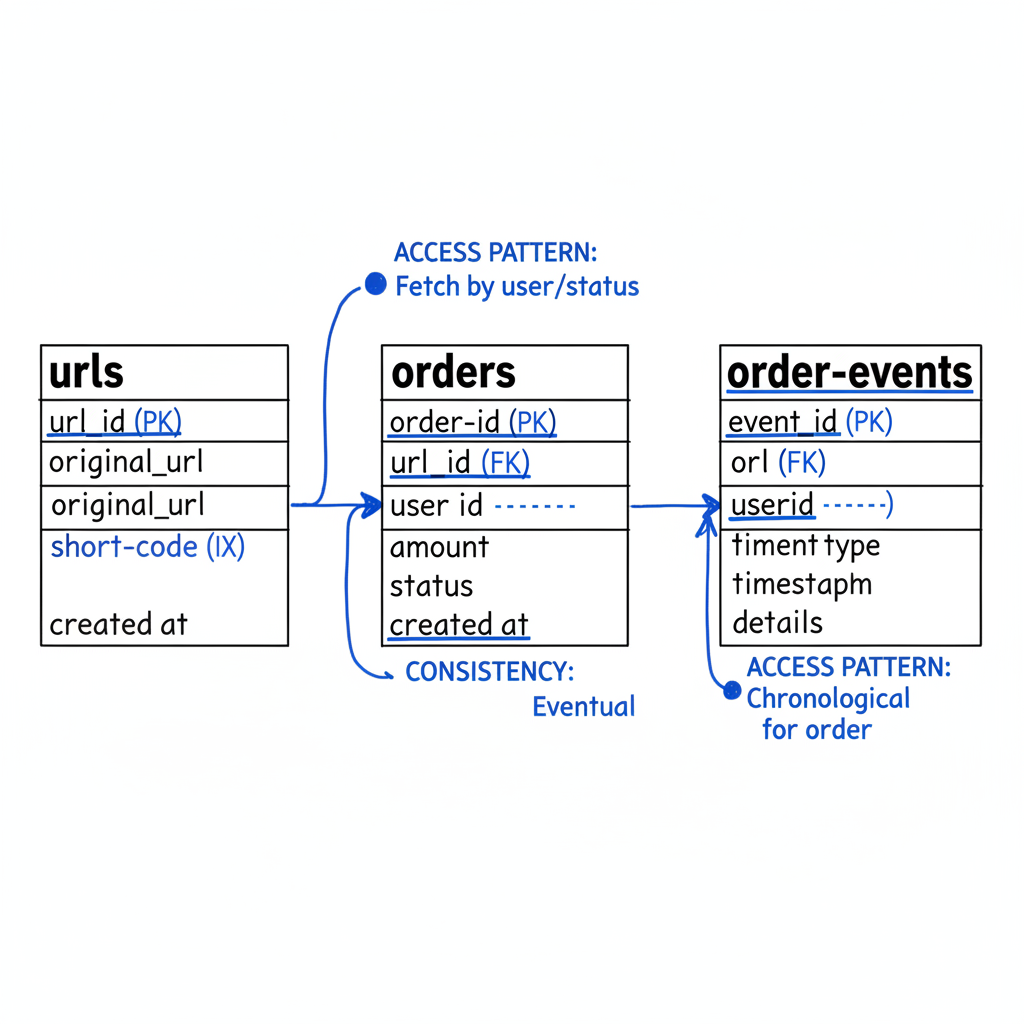
For an order tracking system:
- Table:
ordersorder_id(PK)user_idstatus(PLACED, SHIPPED, OUT_FOR_DELIVERY, DELIVERED, CANCELLED)created_at
- Table:
order_eventsevent_id(PK)order_id(index)event_type(PACKAGE_SCANNED, DEPARTED_FACILITY, etc.)locationtimestamp
Mention access patterns:
- Most frequent queries: by
order_idanduser_id. - Why certain fields are indexed.
- When you’d pick relational vs. NoSQL:
- Relational for strong consistency and relationships.
- NoSQL for massive scale, simple key‑based lookups.
5. Scaling and Performance: Where Will This Break?
Amazon cares a lot about operating at scale. Even if the prompt doesn’t shout it, assume growth.
Touch on:
- Read vs write traffic:
- URL shortener: heavy reads, moderate writes → emphasize caching.
- Order updates: writes (events) + reads from clients.
- Caching strategy:
- Use an in‑memory cache (Redis‑like) for hot keys.
- Cache
shortCode → longURLandorderId → order summary. - Discuss TTLs and cache invalidation at a high level.
- Horizontal scaling:
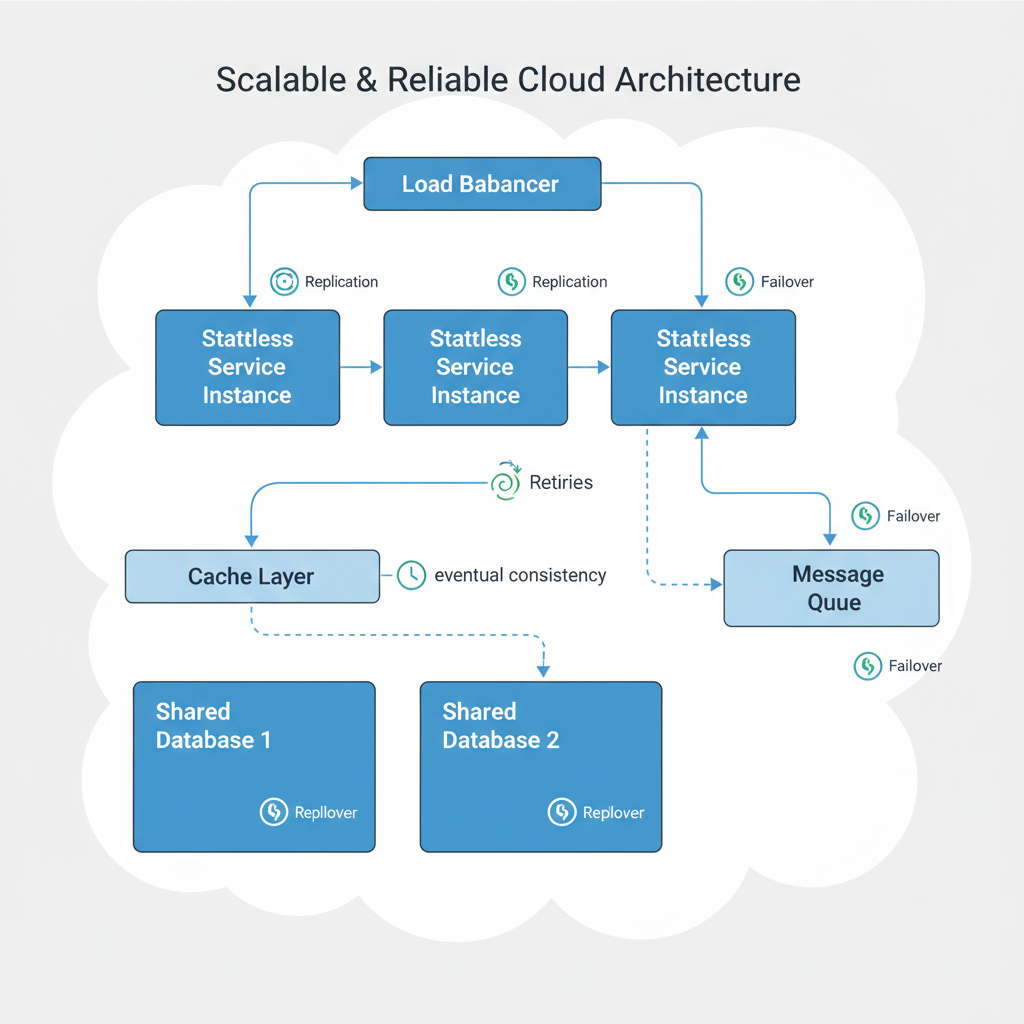
- Stateless service instances behind a load balancer.
- Scale out by adding instances rather than vertical scaling.
- Partitioning / sharding:
- Hash‑based sharding on
shortCodeororderId. - Explain the benefit: spread load, avoid single‑node bottlenecks.
- Hash‑based sharding on
You don’t need to write formulas for QPS vs disk IOPS, but you should:
- Mention read/write patterns.
- Note obvious bottlenecks (single DB, single cache instance).
- Offer one or two strategies to address them.
6. Reliability, Consistency, and Trade‑Offs
This is where seniority shows.
At Amazon scale, failures are guaranteed, not hypothetical. In your OA design, explicitly mention:
- Replication & failover:
- Databases replicated across AZs/regions.
- Health checks and automatic failover.
- Idempotency & retries:
- For APIs that may be retried (e.g., event ingestion), design idempotent operations.
- Eventual consistency where acceptable:
- Analytics, logs, counters can be eventually consistent.
- Core user flows (charging a card, placing an order) need stronger guarantees.
- Trade‑off example:
- In a notification system: “We choose availability over strict consistency. It’s better that a user might receive a late or duplicate notification than block the entire purchase flow.”
You don’t have to name CAP theorem, but you should act like you’ve internalized it.
7. Non‑Functional Requirements: Security, Cost, Observability
This is where many candidates skip — and where you can stand out.
Even a short paragraph on each helps:
- Security & privacy
- AuthN/AuthZ on management APIs.
- Encrypt data at rest and in transit.
- Protect against obvious abuse (rate limiting, input validation).
- Cost awareness
- Use caching to reduce expensive DB reads.
- Consider cold vs hot storage for logs/analytics.
- Batch operations where strong real‑time isn’t needed.
- Observability
- Metrics: QPS, error rates, latency percentiles.
- Logs: structured logs for debugging.
- Alerts: on SLA breaches (e.g., 99th percentile latency > target).
Amazon’s culture strongly values operational excellence. Reflect that.
Example Walkthrough: Design an Order Tracking Service (Amazon‑Flavored)
Let’s combine the steps into a mini case study.
Prompt (simplified): Design an order tracking service that lets customers see the status and location updates of their Amazon orders.
1. Clarify & scope
- Customers should be able to:
- View all orders.
- See current status and a basic timeline per order.
- Internal systems (warehouses, carriers) will send events.
- Assume:
- 100M orders/month.
- Peak 10K reads/sec, 5K writes/sec for events.
2. APIs
GET /users/{userId}/orders→ list of orders.GET /orders/{orderId}→ status, key milestones, ETA.POST /orders/{orderId}/events→ internal call from logistics systems.
3. High‑level components
- Order Tracking API Service — handles client requests.
- Ingestion Service — validates and processes incoming tracking events.
- Message Queue / Stream — decouples event producers from consumers.
- Order Store — main DB for orders and current status.
- Event Store — stores full history of tracking events.
4. Data model (sketch)
orders(relational or key‑value)order_id,user_id,status,last_update_ts,eta.
order_eventsevent_id,order_id,event_type,location,timestamp.
5. Scale & performance
- Use cache for
GET /orders/{orderId}; populated on read or write. - Shard by
order_idhash for both orders and events. - Stream events through a queue to allow multiple consumers (notifications, analytics, ML prediction of delays).
6. Reliability & trade‑offs
- Tracking updates are eventually consistent; a delay of a few seconds is OK.
- Stronger consistency for core order data (placement, payment) handled by upstream systems — we subscribe to updates.
- If an event is lost or delayed, worst case: UI shows a slightly stale status, not a billing error.
7. Non‑functionals
- Security: Customers can only view their own orders; internal endpoints behind service‑to‑service auth.
- Cost: Use tiered storage; recent events in fast storage, older events archived.
- Observability: Track end‑to‑end latency between event ingestion and UI reflection.
This is the level of detail that usually scores highly in an OA: structured, assumption‑driven, aware of trade‑offs, without drowning in minutiae.
How to Practice Effectively for Amazon’s Design OA
You don’t need to spend six months reinventing distributed systems. A focused 2–4 weeks can take you very far.
1. Master 5–7 Common Design Scenarios
Rotate through patterns like:
- URL shortener / pastebin (key‑value, heavy read)
- News feed / timeline (ranking, fan‑out)
- Notification service (fan‑out, async, retries)
- Search autocomplete (trie / prefix index, latency)
- Order tracking / booking systems (events, lifecycle)
- Rate limiter (state, fairness, performance)
For each, practice writing:
- Clarifications and assumptions.
- APIs.
- High‑level architecture.
- Data model.
- Scale + reliability notes.
2. Time‑box Your Practice Like the Real OA
Set a 30–40 minute timer:
- 5 minutes: clarify + write assumptions.
- 10–15 minutes: draw high‑level architecture and data model.
- 10–15 minutes: scale, reliability, non‑functionals.
You’re training your brain to prioritize under pressure.
3. Get Feedback (Even If You’re Solo)
If you don’t have a mentor:
- Compare your designs with reputable system design resources.
- Ask: Did I identify bottlenecks? Did I show trade‑offs? Are my assumptions explicit?
If you do have someone to review it, ask them to rate you on:
- Clarity of communication.
- Coverage of critical aspects (data, scale, reliability).
- Justification of choices, not just the shape of the diagram.

Rapid‑Fire Checklist Before You Submit Your OA Design
Before you hit submit, scan for these items:
- Did I restate the problem and list assumptions?
- Did I define 2–4 core APIs or user flows?
- Did I provide a clear high‑level architecture (main components, data flow)?
- Did I sketch a basic data model aligned with access patterns?
- Did I talk about scaling (caching, sharding, horizontal scaling)?
- Did I address reliability (failures, retries, eventual consistency)?
- Did I mention security, cost, or observability at least briefly?
If you can honestly check most of these, you’re in very good shape.
Final Thoughts: Your Goal Isn’t Perfection, It’s Reasoning
Amazon isn’t expecting you to recreate the actual Prime Video architecture from memory.
They’re looking for engineers who:
- Can dissect messy requirements.
- Make sensible, explicit assumptions.
- Design modular, scalable systems.
- Communicate trade‑offs like a teammate they’d trust in a real design review.
So the next time you see “Amazon online assessment design” in your prep plan, don’t just watch another 2‑hour video.
Practice a few realistic prompts using the 7‑step framework above, time yourself, and focus on clarity over cleverness.
That’s what actually moves the needle.
Leave a Reply