Amazon Box Sizes Explained Simply
You know that oddly tiny item that shows up in a comically huge Amazon box? Yeah, that one.
If you’ve ever wondered how Amazon box sizes actually work — whether you’re a seller trying to ship smarter or a buyer just curious why your pencil came in a shoe-box-sized container — this guide will walk you through it in plain English.
We’ll cover how Amazon’s box system works, common Amazon box sizes, FBA packaging rules, and some practical tips to save money (and cardboard).
What Are Amazon Box Sizes, Really?
Let’s clear something up first: there is no single public, official master list of every Amazon box size that Amazon uses internally. Their fulfillment network uses hundreds of box sizes and keeps evolving them for efficiency, automation, and regional needs.
However, for sellers, the story is more practical:
- You are not required to use Amazon-branded boxes.
- You are required to follow Amazon’s packaging and prep requirements for FBA (Fulfilled by Amazon) inventory.
- If you do use standard shipping cartons (yours or theirs), size and weight will directly affect your FBA fees and shipping costs.
So when we talk about “Amazon box sizes” from a seller or logistics point of view, we’re usually talking about:
- Common shipping carton sizes compatible with Amazon’s rules.
- Dimension and weight limits for FBA.
- How to pick box sizes that keep your fees and damage rates low.
Amazon FBA Box Requirements You Can’t Ignore
Before getting clever with box sizes, you have to play by the rules.
Here are the key FBA carton-level rules (for standard, non-palletized shipments into Amazon fulfillment centers):
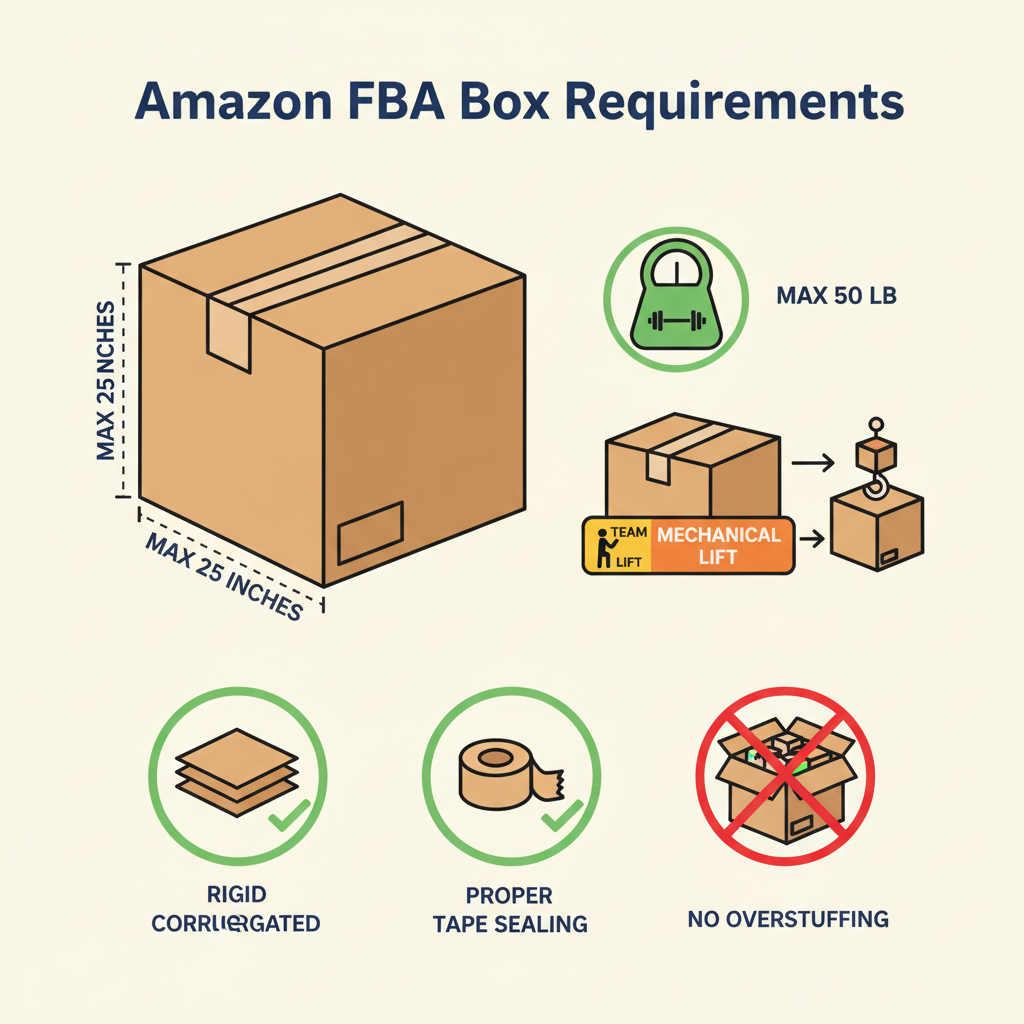
- Maximum box weight: 50 lb for most boxes.
- Exception: single large units that weigh more than 50 lb must be labeled as “Team Lift”; items over 100 lb must be labeled “Mechanical Lift”.
- Maximum box dimensions: generally no side should exceed 25 inches for standard boxes, unless it’s oversized inventory (think furniture, big appliances).
- Boxes must be rigid, 6-sided, and sealed with strong tape (no straps or string only).
- No overstuffed or bulging boxes – they need to stack safely on conveyors and in warehouses.
- Use minimum 32 ECT corrugated cardboard (basic shipping-grade strength) or better for most shipments.
- Mixed-SKU boxes (multiple products in one carton) must have accurate box content information uploaded (dimensions + weight + contents) or packed using compatible workflow/scanners.
The exact numbers and exceptions can vary slightly by region and program, so it’s smart to double-check Amazon’s current FBA Packaging and Prep Requirements in Seller Central before a big shipment.

Common Amazon-Friendly Box Sizes (And When to Use Them)
Even though Amazon doesn’t publish its internal box matrix, many 3PLs, prep centers, and high-volume sellers gravitate toward a core set of carton sizes that work well with FBA.
Here are example box sizes (in inches) that are commonly used because they balance cost, handling, and FBA constraints:
Small Product / Accessory Boxes
Great for cosmetics, supplements, small electronics, books, and light accessories.
- 8 x 6 x 4 in – Good for small gadgets, 1–2 small units.
- 9 x 6 x 3 in – Ideal for single small product or a compact kit.
- 10 x 8 x 4 in – For slightly bulkier accessories or 3–5 small items.
Why these work:
- Easy to handle.
- Less void fill needed.
- Keeps dimensional weight low.
Medium General-Purpose Cartons
Your everyday workhorses for bundles, multi-packs, and medium-sized products.
- 12 x 9 x 6 in – Popular for books, apparel stacks, multi-packs.
- 14 x 10 x 6 in – Flexible size for mixed content or larger units.
- 16 x 12 x 8 in – For bulkier items or higher unit counts.
These sizes give you enough room for bubble wrap or airbags while staying within safe stacking and shipping ranges.
Larger / Bulk Shipment Boxes
For case packs, larger products, or sending many units of a lightweight SKU.
- 18 x 14 x 10 in – Great for case-packed inventory (e.g., 24–48 units of a small, light product).
- 20 x 16 x 12 in – For bulkier but still relatively light items.
- 24 x 18 x 12 in – Approaching the upper practical size for standard FBA cartons.
With these, weight control becomes critical. It’s easy to exceed 50 lb with dense items.
Important: These sizes are examples, not an Amazon-issued standard. The goal is to select a few repeatable, efficient sizes that:
- Fit your products with minimal void.
- Stay under 50 lb.
- Are simple to stock and reorder.

How Amazon Chooses Box Sizes for Customer Orders
From a buyer’s perspective, the real mystery is: Why did they send this tiny thing in that boat-sized box?
Here’s the high-level process (simplified):
- Algorithmic cartonization: Amazon’s system picks a box based on the dimensions and weights of the items in your order.
- Inventory location: Items might be in different parts of a warehouse, or in separate warehouses entirely.
- Conveyor & machine constraints: Some items have to go through certain packaging machines that support only specific box sizes.
- Damage prevention: Fragile items may be given more space and padding.
So sometimes the system says: “We’ve got a small book, but the items nearby, the machines available, and the packing queues mean… yeah, it’s going in a bigger box today.”
No, it’s not personally targeting you.

How to Choose the Right Amazon Box Size as a Seller
If you’re shipping FBA inventory, choosing box sizes is about balancing cost, safety, and compliance.
Here’s a step-by-step approach:
1. Map Your Product Catalog by Size & Weight
Group SKUs into rough buckets like:
- Tiny & light (e.g., cables, small cosmetics).
- Small/medium & light (e.g., shirts, supplements, paperback books).
- Small/medium & dense (e.g., glass jars, metal parts).
- Large & light (e.g., pillows, foam items).
- Large & heavy (e.g., gym equipment, appliances).
Each bucket will naturally gravitate toward 1–3 ideal carton sizes.
2. Design Around Case Packs Where Possible
Amazon loves case-packed units with consistent pack counts and dimensions.
For example:
- 24 units of a supplement bottle: maybe they fit perfectly in a 12 x 9 x 6 in box.
- 12 units of a skincare tube: perhaps 10 x 8 x 4 in is your sweet spot.
Once you find a repeatable fit, lock it in as a standard case pack box size.
3. Keep Dimensional Weight in Check
Carriers often charge by dimensional weight, not just actual weight.
That means a big, mostly-empty box can cost more than a smaller, denser one. Using oversized boxes for small products:
- Increases your inbound shipping costs.
- Can bump your FBA storage and fulfillment fees because of larger measured dimensions.
Choose boxes that:
- Provide enough padding.
- Avoid more than ~2–3 inches of excess space per side when possible.
4. Standardize, But Don’t Overdo It
Some sellers go too far and try to run their entire operation on 2–3 box sizes. That can lead to:
- Overstuffed boxes (damage risk).
- Way too much void fill.
- Inefficient use of warehouse space.
Aim for something like 5–10 core carton sizes that cover:
- Small case packs
- Medium mixed SKU cartons
- Large but light items
- Oversized/long items (if you sell them)
5. Test and Track Damage Rates
Watch your damage and return rates on FBA shipments over time.
If you see higher-than-average damages for a particular SKU or box size combo:
- Upgrade to thicker cardboard.
- Use a slightly smaller box with tighter packing.
- Add padding (bubble wrap, paper, inserts) and re-measure.
Real-World Scenarios: Picking Amazon Box Sizes
Let’s run through a few mini scenarios.
Scenario 1: Vitamin Bottles (Light, Medium-Small)
You sell a 120-count vitamin bottle, about 5 in tall and 2.5 in diameter, 0.5 lb each.
- Case pack: 24 units.
- Side-by-side grid with padding fits nicely in 12 x 9 x 6 in.
- Total weight: ~12–14 lb with packaging.
This box is:
- Under the 50 lb limit.
- Compact.
- Easy to handle for warehouse staff.
Scenario 2: Hardcover Books (Dense & Heavy)
Hardcover books are small but dense.
Let’s say one book is 1.5 lb, and you want to send 20 per carton.
- Total weight ~30 lb + a bit for the box.
- A 14 x 10 x 6 in box could be a strong choice.
But if you try to fit 40 books into a huge box:
- You might exceed 50 lb.
- The box becomes harder to handle and more prone to damage.
Scenario 3: Large Light Items (Pillows)
You sell decorative pillows – big but feather-light.
- You might use a 24 x 18 x 12 in carton.
- It stays very light, well under 50 lb.
- But you must be mindful of dimensional weight on the inbound carrier side.
FAQs About Amazon Box Sizes
Do I have to use official Amazon boxes for FBA?
No. You can use your own cartons as long as they meet Amazon’s packaging, size, and weight requirements.
Can I print Amazon logos on my shipping boxes?
Generally, no — you should not use Amazon branding unless you’re part of a specific authorized program. For most sellers, plain or branded (your brand) boxes are the norm.
What happens if my box is over 50 lb?
Your shipment may be rejected, delayed, or receive extra handling fees at fulfillment centers. If a single unit naturally weighs more than 50 lb, you must follow Amazon’s heavy item labeling rules.
Is there a benefit to using fewer box sizes?
Yes, up to a point:
- Easier inventory of packaging.
- Faster packing training.
- Better purchasing leverage on fewer SKUs.
But too few sizes can increase void fill costs and shipping inefficiencies.
How to Build Your Own “Amazon Box Size” Playbook
If you want to turn box size chaos into something sane and scalable, here’s a simple framework:
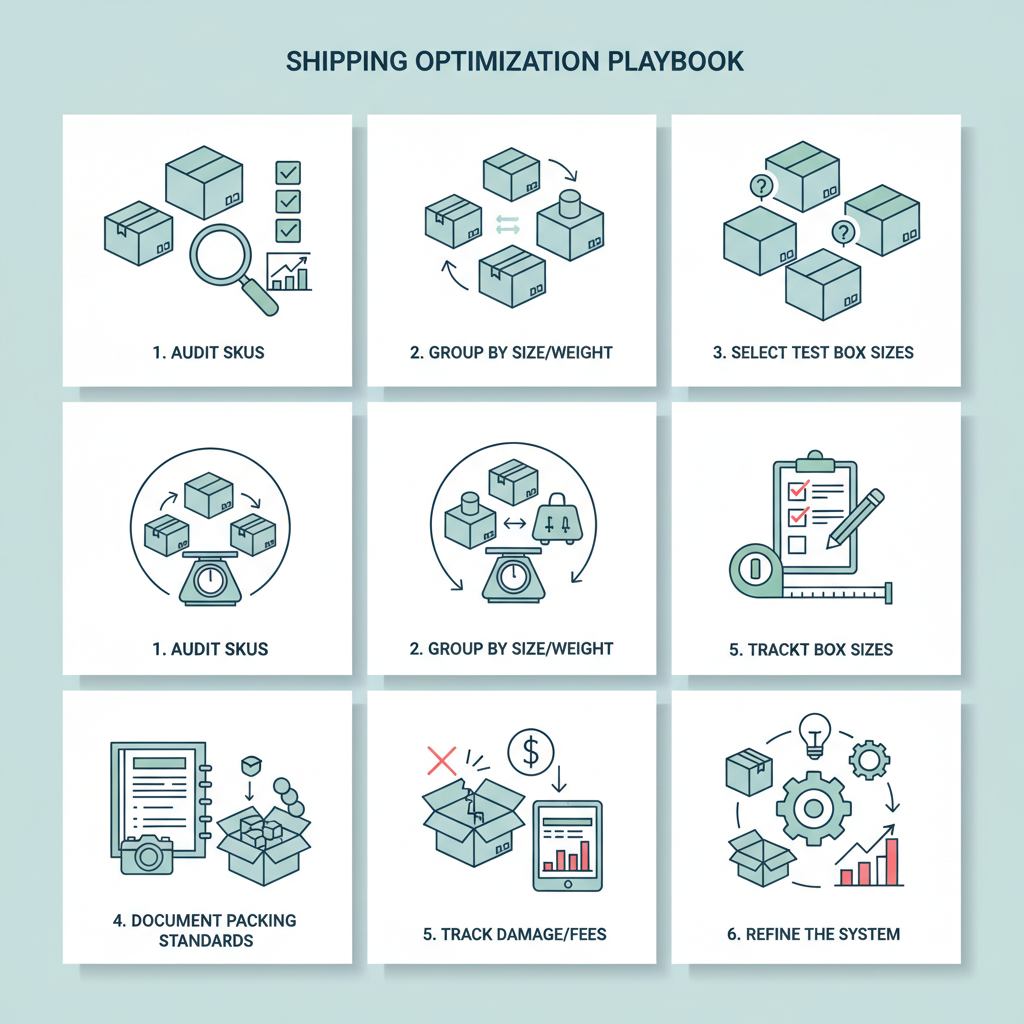
- Audit your SKUs – Measure and weigh your top 20–50 products.
- Group them into size/weight buckets – Tiny/light, small/medium, dense, large/light, etc.
- Pick test box sizes – Start with 5–7 carton sizes covering your main use cases.
- Create packing standards – Document: “SKU X ships in Box A with Y layers of padding.”
- Track performance – Monitor inbound issues, damage rates, and shipping costs.
- Refine – Add/retire box sizes based on real-world data.
Do this once, and suddenly “Amazon box sizes” stop being a guessing game and start feeling like a system.
Leave a Reply